Composite Charts
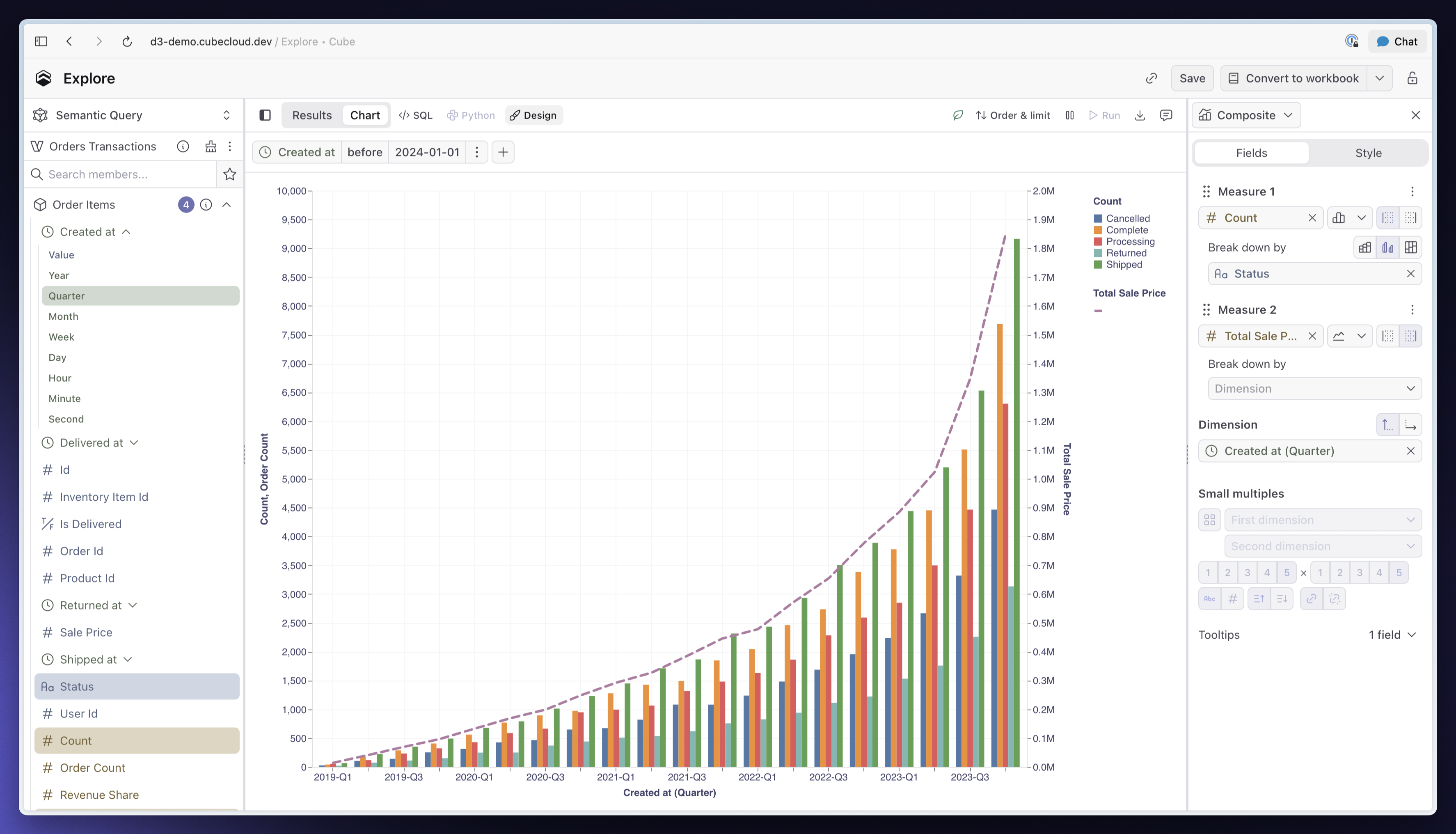
You can now combine several measures in one chart, each with its own chart type, axis, and breakdown. Plot revenue as bars and order count as a line, use separate axes when their scales differ, or synchronize both axes to compare measures on the same scale.
The redesigned Fields and Style tabs make multi-measure charts easier to build and adjust. Drag measures to reorder them, customize colors, line styles, and point shapes independently, and configure each axis alongside the measures it displays. Watch Composite charts in Cube to see it in action.
Other improvements and fixes:
Dashboards
- Improved publishing controls with visible Undo and Redo buttons, clearer publishing status, and direct access to View and Revert changes
- Published Dashboards now show their version, publication time, and a summary of changes since the previous published version
- Added Reset to default support across Dashboard controls, with Clear actions for Filter, Time Granularity, and Parent controls
AI
Added custom OpenAI-compatible and Anthropic-compatible endpoint support for bring-your-own models, including custom request headers.
Embed
Added whole-Dashboard PNG and PDF export support to embedded Dashboards and Creator Mode when exports are enabled.
Integrations
- Added pivot row totals support for Google Sheets and Excel, with totals calculated using each measure’s aggregation and preserved when saved explorations are refreshed
- Fixed Snowflake pre-aggregation builds failing on
TIMESTAMP_TZandTIMESTAMP_LTZcolumns
Modeling
- Added uploaded dbt manifest support for semantic model sync, plus
cube dbt generateto write generated models into your project for review and commit through your own workflow, without granting Cube access to your dbt repository - Fixed incorrect totals and missing rows in pre-aggregation queries combining nested aggregations, sorting, and limits
API
- Fixed SQL queries failing against views spanning multiple data sources when the selected fields all belong to one data source
- Fixed older
useCubeQueryresponses overwriting results after the query changes